CloudStack DNS Framework
Overview
The DNS Framework in Apache CloudStack introduces a pluggable architecture for Domain Name System (DNS) management. It enables CloudStack to integrate with external DNS providers and manage DNS zones and records as part of cloud orchestration.
This framework is designed with extensibility in mind, allowing additional DNS provider plugins to be added in the future with minimal changes to the core system.
As part of the initial implementation, PowerDNS is the supported DNS provider.
Terminology and Hierarchy
The DNS Framework introduces several new concepts and entities:
DNS Provider Type: The underlying software or service facilitating DNS integration (e.g., PowerDNS).
DNS Server: A configured, operational instance of a DNS Provider Type containing connection details, API endpoints, and access credentials (e.g., NYC-PowerDNS-01).
DNS Zone: The domain namespace managed by a specific DNS Server (e.g., prod.example.com).
DNS Record: An individual entry within a DNS zone that maps a domain name to an IP address or other resource.
Capabilities
The DNS Framework provides two primary capabilities:
DNS Management: create and manage DNS zones and records.
Automatic DNS Record Registration: Automatically manages DNS records for Instances based on their lifecycle events.
These capabilities can be used independently or together, depending on deployment requirements and operational preferences.
DNS Server Configuration
Before using DNS management or automatic DNS record registration, a DNS server must be configured in CloudStack.
A DNS server represents integration between CloudStack and a supported DNS provider (for example, PowerDNS) and includes all necessary connection details and credentials.
UI Overview
The CloudStack UI has been enhanced to include DNS management capabilities.
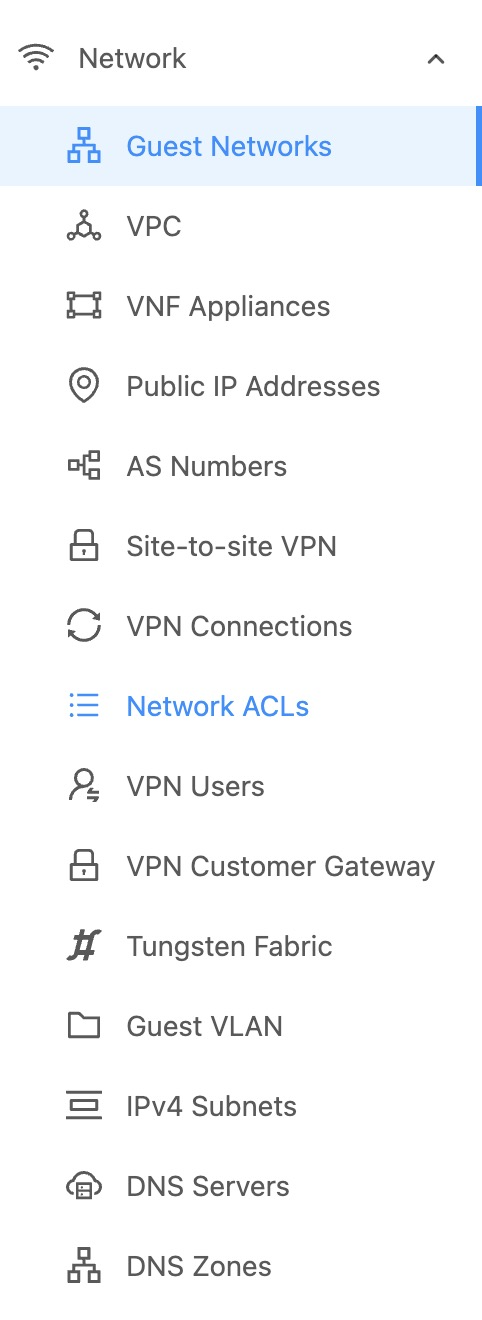
DNS Servers and DNS Zones are now available under the Network section in the left navigation panel.
Adding a DNS Server
DNS server configuration is required to manage zones and records in CloudStack.
When adding a DNS server, CloudStack stores the following information:
Provider type (for example, PowerDNS)
API endpoint used to communicate with the DNS provider
Authentication credentials (API key or username/password)
Name servers used for zone delegation
Optional metadata such as public accessibility and domain suffix rules
This configuration enables CloudStack to perform DNS operations on behalf of users, including zone creation, record management, and automatic instance DNS registration.
DNS servers can be added either through the CloudStack UI or using the API.
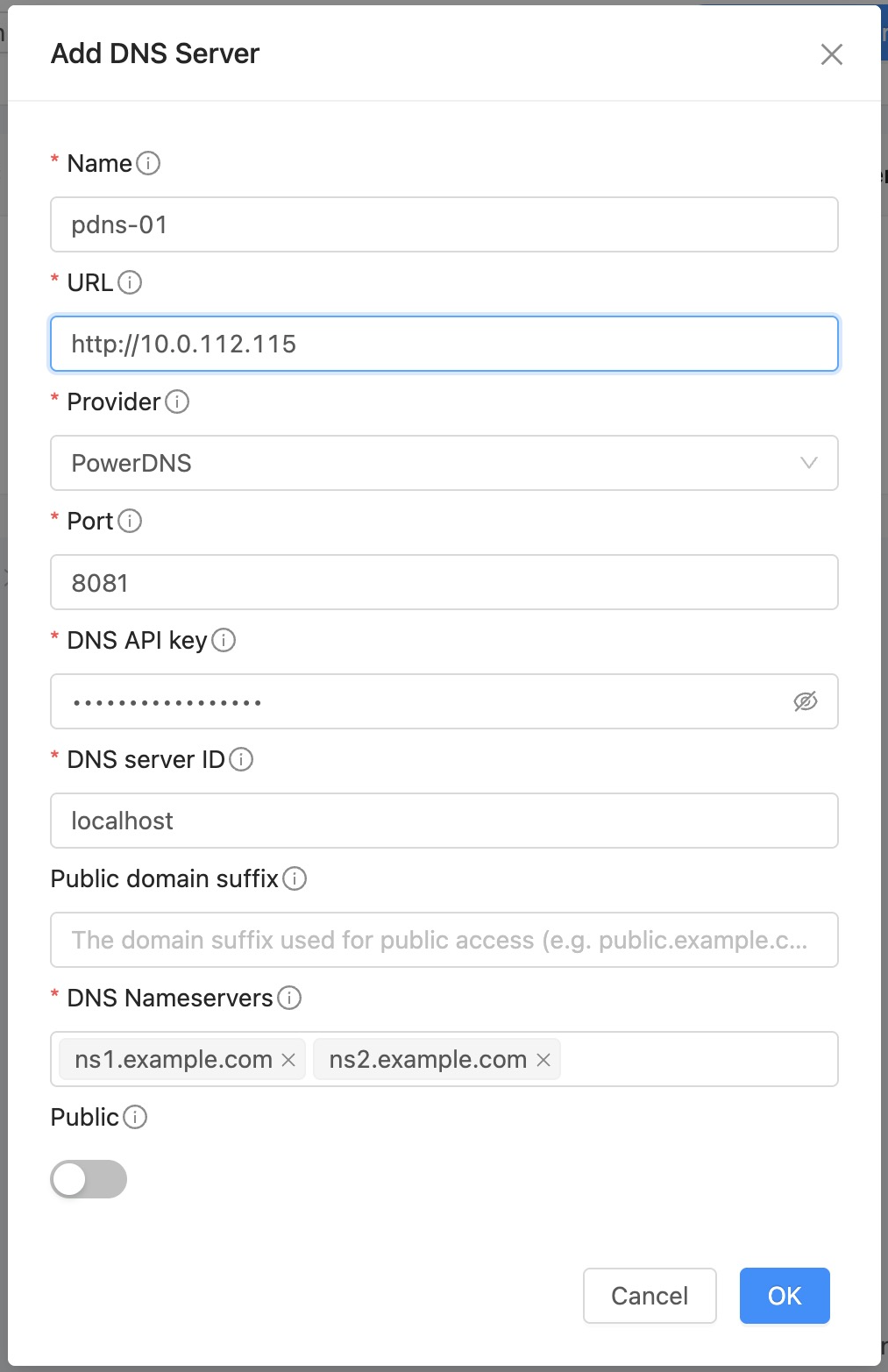
Using the API, a DNS server can be added with a command similar to the following:
cmk add dnsserver name="pdns-01" provider="PowerDNS" \
   url="http://<powerdns-ip>:8081" dnsapikey="<api-key>" \
   nameservers="ns1.cloud.internal,ns2.cloud.internal" details[0].pdnsServerId=localhost
Parameters
Name |
Required |
Description |
|---|---|---|
|
Yes |
Unique name for the DNS server |
|
Yes |
DNS provider type (e.g., |
|
Yes |
API URL of the DNS provider |
|
Yes |
API key or token used for authentication |
|
Yes |
Comma separated list of name servers; used to create NS records for the DNS Zone (for example, ns1.example.com, ns2.example.com) |
|
No |
Username or email associated with the DNS provider account |
|
No |
Additional provider-specific details in key-value format (e.g., for PowerDNS, |
|
No |
Port number of the DNS server (if different from default) |
|
No |
Specifies whether the DNS server is publicly accessible to other accounts |
|
No |
Specifies the domain suffix under which the DNS zone is created when the DNS server is not owned by the user (e.g., |
Note
Public DNS servers can be used by other accounts, only admin and domain admins can create Public DNS server.
If user creates a DNS zone using non-owned Public DNS server, the zone will be created with a domain suffix defined in the Public DNS server configuration (e.g., if the suffix is
example.comand user creates a zone namedtest.com, the actual zone created in the DNS provider will betest.example.com).Nameservers provided during DNS server addition are used for DNS zone creation.
Listing DNS Servers
The listDnsServers API returns DNS servers accessible to the caller.
This includes:
DNS servers owned by the calling account
Public DNS servers available in the same domain or any parent domain
cmk list dnsservers
Updating a DNS Server
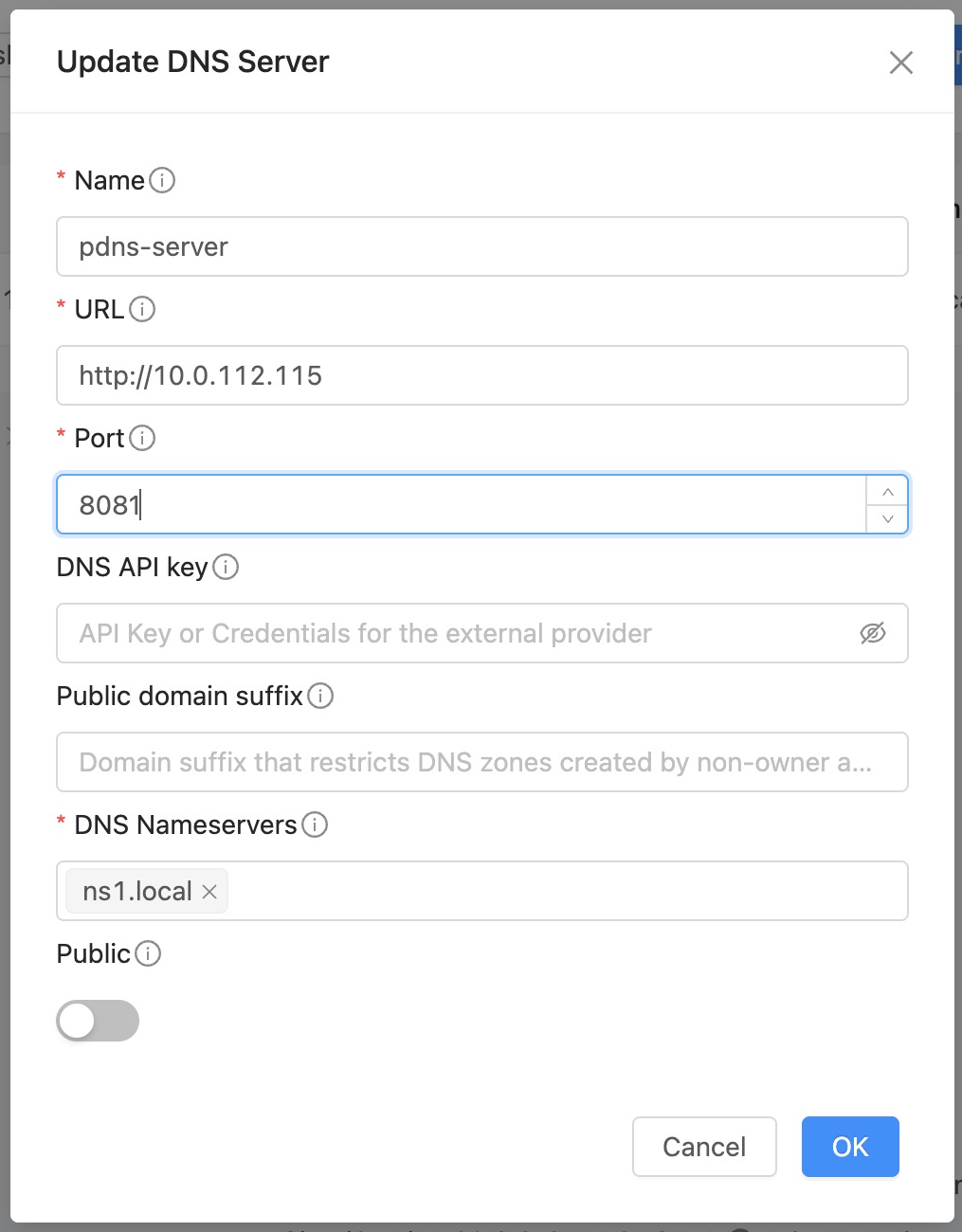
DNS Server configuration can be updated to modify connection details, credentials, name servers, and other metadata. This allows administrators to maintain accurate configurations as DNS provider details change or to update operational parameters without needing to recreate the DNS server.
From UI:
Using the API:
cmk update dnsserver id=<dns-server-id> \
     nameservers="ns1.cloud.internal,ns2.cloud.internal,ns3.cloud.internal" \
     name="pdns-new-server"
Parameters
Note
Updating nameservers only affects new DNS zones created through this server. Existing DNS zones and their current NS records are not modified.
Deleting a DNS Server
A DNS server can be deleted from CloudStack using the UI or API.
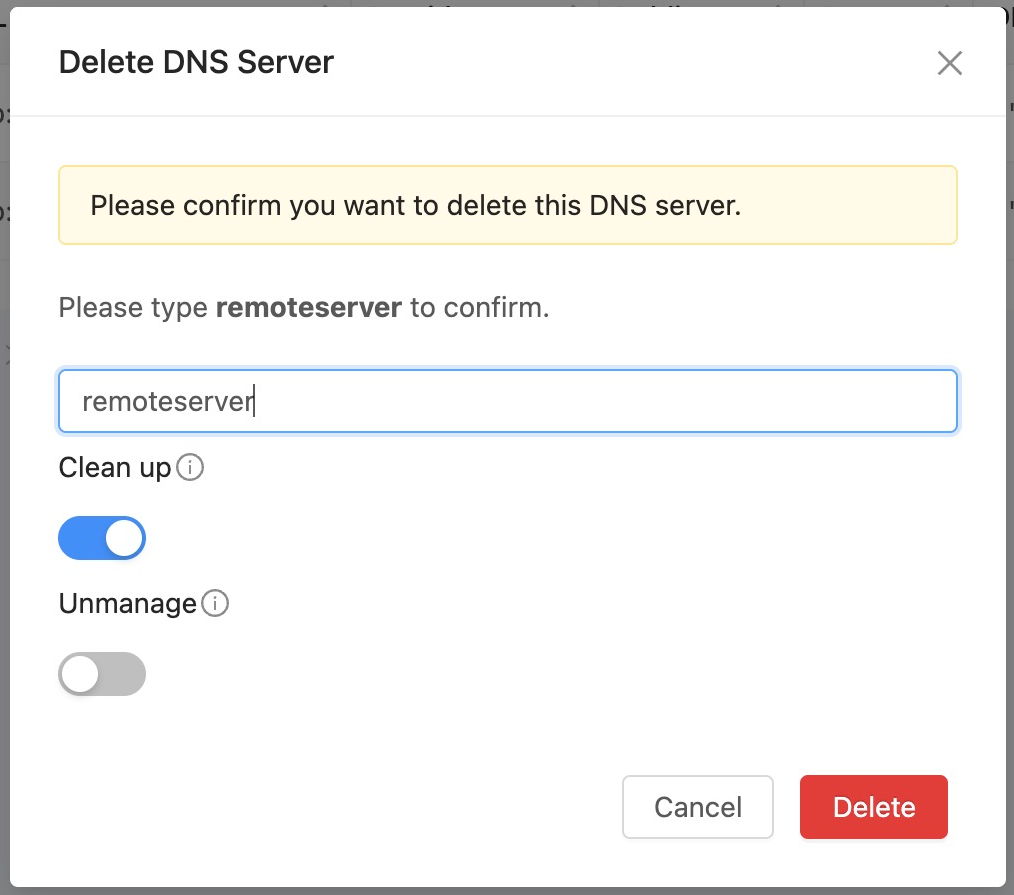
By default, all DNS zones associated with the server are also deleted. To retain them, set cleanup to false.
When cleanup is enabled, you can use unmanage to remove DNS zones only from CloudStack without deleting them in the external DNS provider.
From UI:
Quick action buttons are available in the UI to delete a DNS server.
Using the API:
cmk delete dnsserver id=<dns-server-id> cleanup=true unmanage=false
Parameters
Name |
Required |
Description |
|---|---|---|
|
Yes |
The ID of the DNS server |
|
No |
If false, DNS zones associated with this server will not be deleted. Default: |
|
No |
Applicable only when |
DNS Zone Management
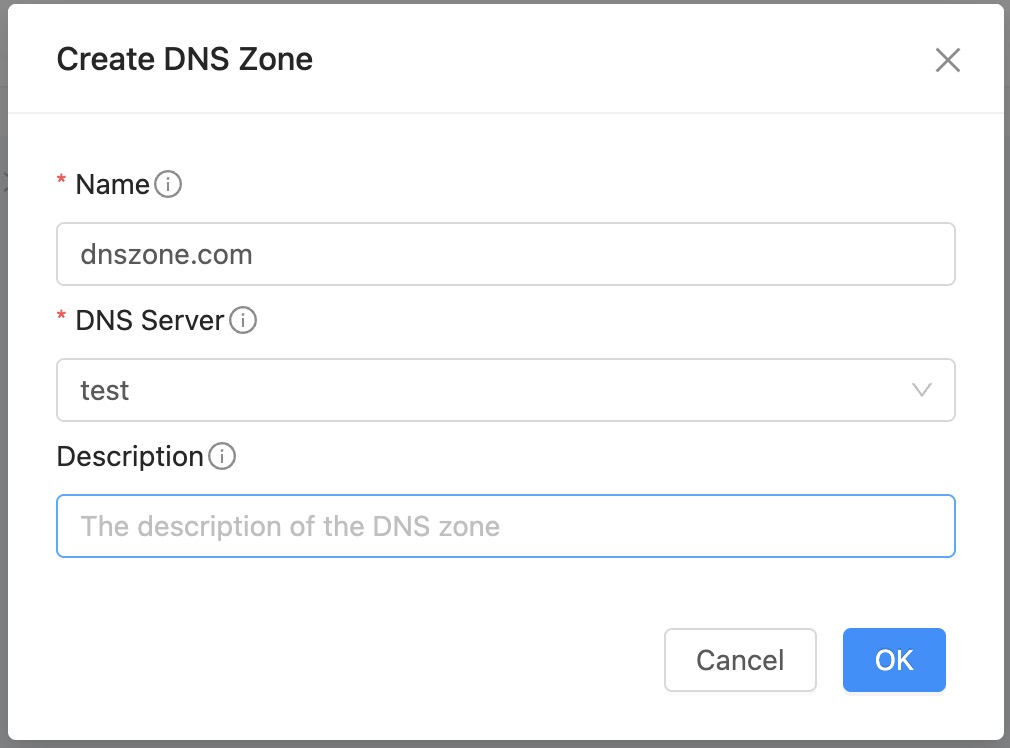
Creating a DNS Zone
A DNS zone is always created under an existing DNS server configured in CloudStack, which determines the external DNS provider where the zone will be provisioned and managed.
From UI:
Using the API:
cmk create dnszone dnsserverid=<dns-server-id> name="example.com" existing=false description="Example DNS zone"
Parameters
Name |
Required |
Description |
|---|---|---|
|
Yes |
The name of the DNS zone (e.g. |
|
Yes |
The ID of the DNS server to host this zone |
|
No |
The description of the DNS zone |
|
No |
If true, imports an existing DNS zone from the external DNS provider into CloudStack; if false, creates the zone in the DNS provider and registers it in CloudStack. Default: |
Listing DNS Zones
The listDnsZones API returns DNS zones accessible to the caller.
This includes:
DNS zones owned by the calling account
Any DNS zones created using DNS servers owned by the caller
cmk list dnszones dnsserverid=<dns-server-id>
Updating a DNS Zone
Only description is allowed to be updated.
cmk update dnszone id=<zone-id> description="New description for the DNS zone"
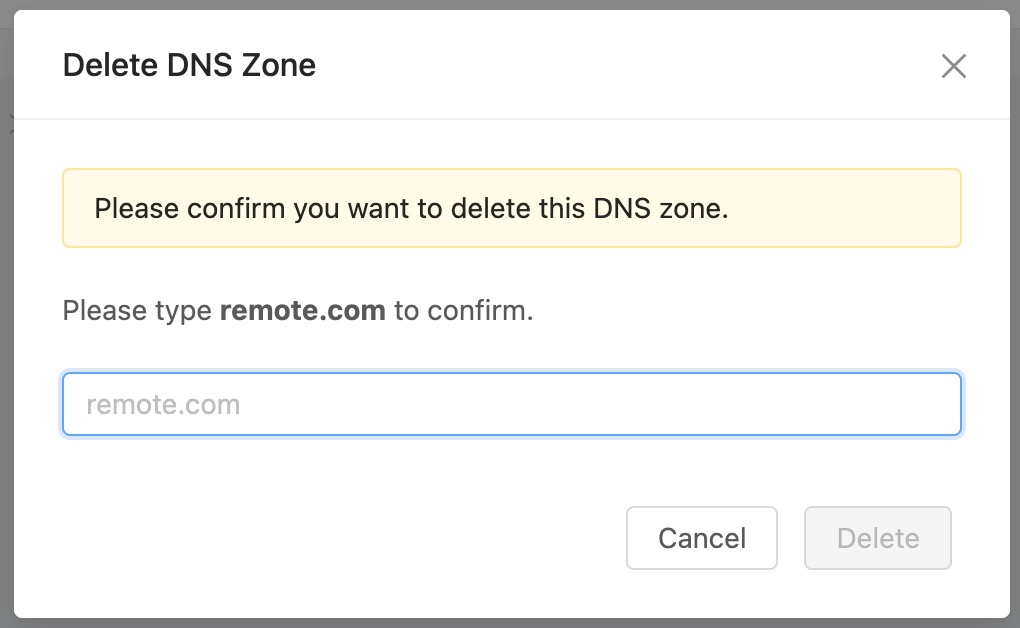
Deleting a DNS Zone
Quick action buttons are available in the UI to delete a DNS zone.
From UI:
Using the API:
cmk delete dnszone id=<zone-id> unmanage=false
Parameters
Name |
Required |
Description |
|---|---|---|
|
Yes |
The ID of the DNS zone |
|
No |
If true, removes the DNS zone only from CloudStack (unmanaged); if false, removes it from CloudStack and deletes it from the DNS provider. Default: |
Note
Deleting a DNS zone will also delete all DNS records within that zone.
DNS Record Management
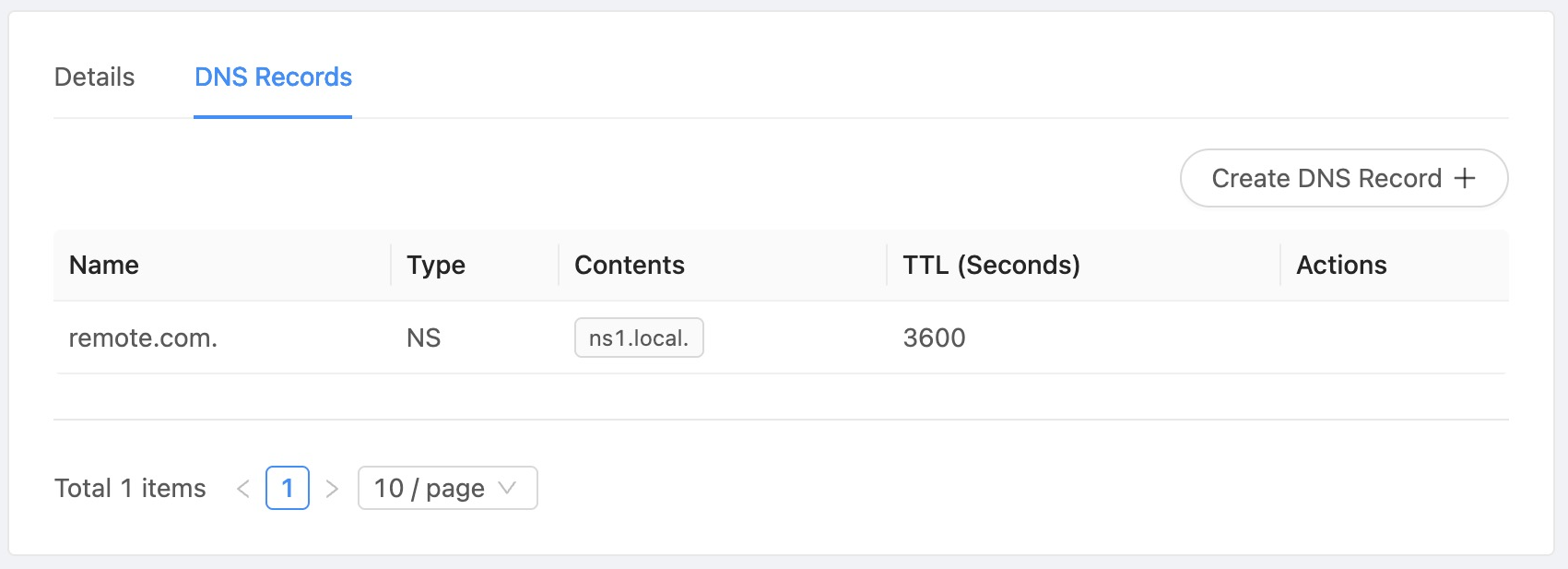
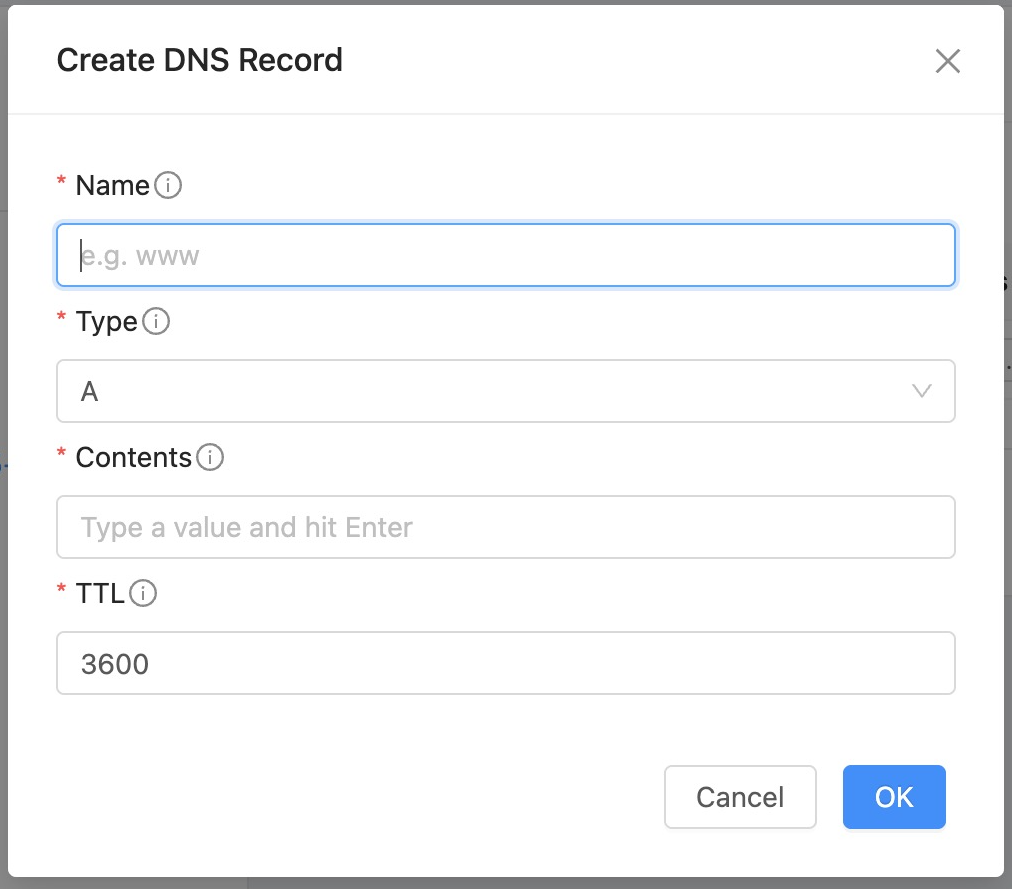
DNS records can be managed using both API and CloudStack UI. In the UI, DNS records are accessible after navigating into a specific DNS zone, where users can perform create, update, and delete operations.
UI Overview
The DNS records can be managed under a selected DNS zone in the CloudStack UI.
Creating a DNS Record
A DNS record represents a mapping between a domain name and its corresponding resource. Records are created within a DNS zone and stored in the configured DNS provider.
Parameters
Name |
Required |
Description |
|---|---|---|
|
Yes |
The ID of the DNS zone where the record will be created |
|
Yes |
DNS record name (e.g. |
|
Yes |
DNS record type (e.g. |
|
Yes |
Content of the record (IP address for |
|
No |
Time to live (TTL) value for the record |
From UI:
From API:
cmk create dnsrecord dnszoneid=<zone-id> name="www" type="A" contents="10.1.1.10" ttl=3600
Note
The format of
contentsdepends on the record type.DNS records are immutable, to update a record, it must be deleted and recreated with the new values.
Deleting a DNS Record
A DNS record can be deleted from the configured DNS provider using CloudStack. This operation removes the record from the associated DNS zone.
From API:
cmk delete dnsrecord dnszoneid=<zone-id> name="www" type="A"
Note
The combination of name and type must match an existing record in the zone.
Automatic DNS Record Registration for Instances
The DNS Framework supports automatic registration and management of DNS records for Instances based on their lifecycle events.
When enabled, CloudStack automatically creates, updates, and removes DNS records corresponding to Instance state changes, ensuring DNS consistency without manual intervention.
Overview
Automatic DNS registration operates at the Instance level and integrates with Instance lifecycle operations.
The feature ensures that DNS records reflect the current state of deployed Instances in real time or near real time, depending on the configured DNS provider behavior.
Prerequisites
Before automatic DNS registration can function, the following conditions must be met:
A DNS server must be configured in CloudStack
A DNS zone must be created and associated with the DNS server
The DNS zone must be associated with a network
If any of the above prerequisites are not met, no automatic DNS operations will be performed.
Behavior
Automatic DNS registration is driven by instance lifecycle events and NIC-level changes within networks that have an associated DNS zone.
Event Mapping
The following table summarizes DNS record operations:
Event |
DNS Action |
|---|---|
Instance creation |
Create DNS record using instance hostname and NIC IP |
NIC addition (plugged into network with DNS zone) |
Create DNS record using instance hostname and NIC IP |
NIC IP address change |
Update corresponding DNS record with new IP address |
Instance deletion |
Delete all DNS records associated with the instance |
NIC removal (unplugged) |
Delete DNS record associated with the NIC |
Associating a DNS Zone to a Network
A DNS zone must be associated with a network before automatic registration can function. Once associated, instance lifecycle events in that network will trigger automatic DNS record creation and management.
This can be done either via the CloudStack UI or API.
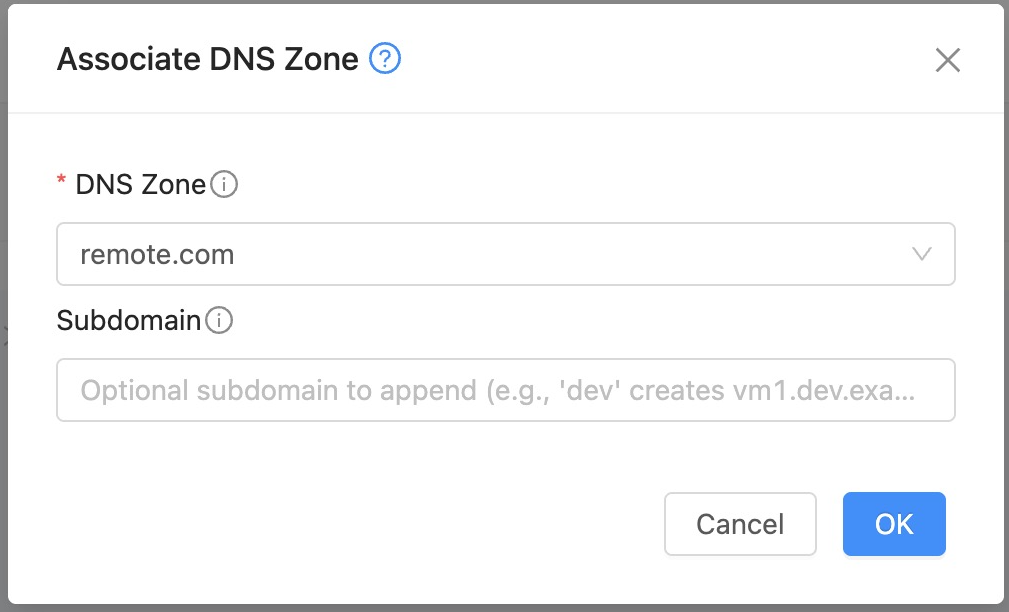
From UI:
We can associate a DNS zone to a network using a quick action on the Network by navigating to the Guest Networks page.
From API:
cmk associate dnszonetonetwork dnszoneid=<dns-zone-id> networkid=<network-id> subdomain=<optional-subdomain>
Parameters
Name |
Required |
Description |
|---|---|---|
|
Yes |
The ID of the DNS zone |
|
Yes |
The ID of the network |
|
No |
Optional subdomain to append to the DNS zone (e.g. |
Note
Existing Instances in the network are not automatically assigned DNS records.
If a DNS zone is associated with multiple networks, instance events from all networks will trigger DNS record management in the same zone, using the subdomain (if provided) to differentiate records between networks.
DNS Naming Convention
By default, DNS records are created using the Instance hostname with following format:
<hostname>.<subdomain>.<dns-zone>
<subdomain> is optional based on the association configuration.
For example, if the hostname is vm1, subdomain is dev, and DNS zone is example.com, the resulting DNS record will be vm1.dev.example.com.
In case of DNS record name collision, creation is skipped to avoid inconsistencies.
A warning is logged and an event of type DNS.NAME.COLLISION is generated for the affected instance.
Users can then choose to manually create a unique DNS record for the instance or update the hostname to resolve the conflict
Instance DNS Information
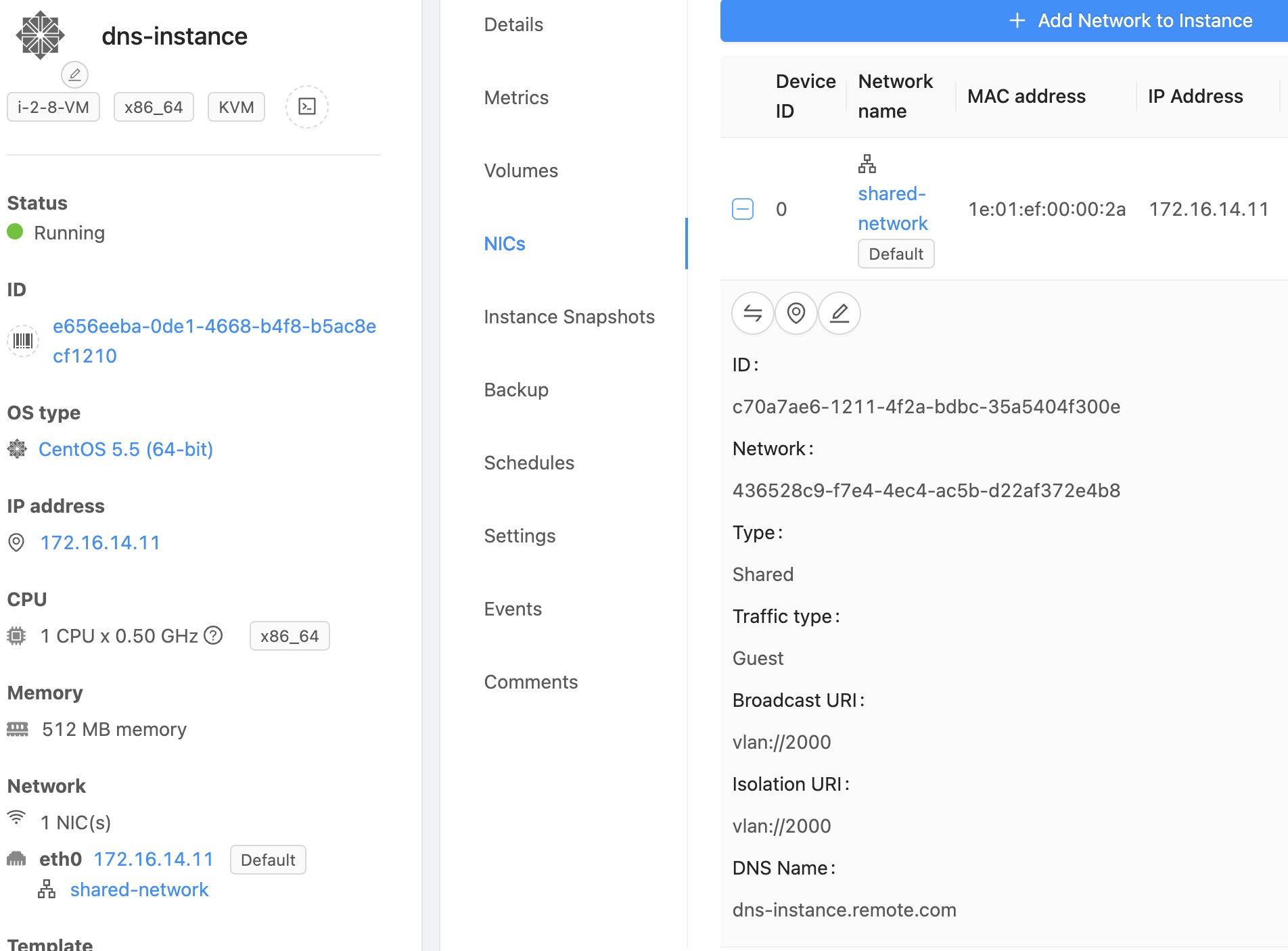
Once a DNS zone is associated with a network, Instances deployed in that network will automatically receive DNS records based on their NIC configuration.
In the Instance details view, the DNS name assigned to each NIC is displayed along with the corresponding IP address. This reflects the DNS record that has been automatically created for the instance.
Note
This feature requires a properly configured DNS server and an associated DNS zone.
Record updates depend on the Instance lifecycle events triggered within CloudStack.
Provider synchronization delays may affect DNS propagation time.
Manual DNS records created in the same zone may conflict with auto-managed records. In such cases, automatic registration may skip creation and log a collision event.
Disassociating a DNS Zone from a Network
A DNS zone can be disassociated from a network, which will stop automatic DNS record management for instances in that network.
Navigate to the Guest Networks page, select the network, and use the quick action to disassociate the DNS zone.
Or use the API to disassociate:
cmk disassociate dnszonefromnetwork networkid=<network-id>
Note
Disassociating a DNS zone from a network does not delete existing DNS records in the DNS provider.
After disassociation, no new DNS records will be created or updated for instances in that network.
Limitations
Automatic DNS registration for Instances is currently limited to Shared Networks